
Before you start
Use an authorised account in your company’s installation. Confirm your service and location scope. Test configuration changes with fictional records before publishing them for employees.
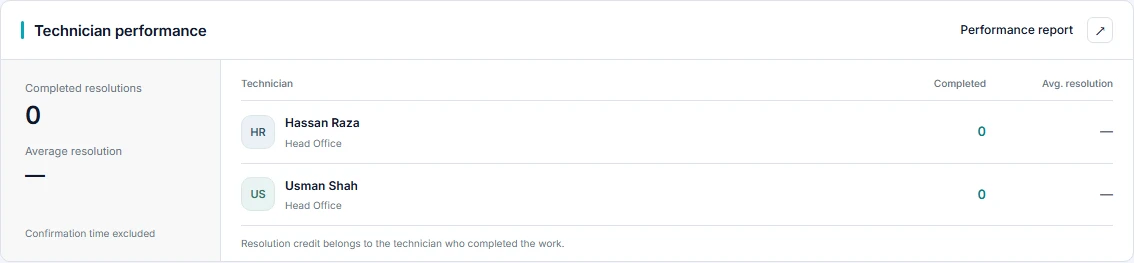
Step-by-step walkthrough
Choose the audience
Use an account authorised to view the team. Performance numbers reflect the available service scope, not necessarily every team in the company.
Open Performance report
From Technician performance, open Performance report to inspect the technician-level measures.
Choose a resolution period
Set Resolved from and Resolved through, then Apply period. Use All time to remove the period restriction.
Check active workload
Review Active work to understand current ownership. Do not describe it as the number resolved in the chosen period.
Compare resolved and confirmed
Read Resolved, Confirmed and Awaiting confirmation together. Work awaiting employee confirmation should not be silently equated with confirmed closure.
Review reopened work
Inspect Reopened alongside volume. A high count can warrant investigation of recurring issues or incomplete fixes; it is not evidence by itself of poor performance.
Interpret resolution time
Check the completed-resolution timing measure and its sample count. Requester confirmation time is excluded from the resolution-time summary.
Check who receives credit
Resolution credit belongs to the technician who completed the work. Reassignment should not be mistaken for transferring historical resolution credit.
Inspect ticket history
Select a technician for resolution history. Compare the underlying request events before drawing conclusions from a small sample.
Make a balanced review
Discuss workload, priority, complexity, reopened work and elapsed resolution time together. Use findings to improve staffing and routing, not just rank raw ticket totals.
Check the result
Repeat the journey as the intended user, including a user outside the permitted scope. Confirm the visible choices, saved record and history match the policy. If an action is absent, check the user’s permissions and the published configuration before changing the workflow.
Configuration labels and available actions depend on the installed version and your role. These instructions describe the current local build.